
Mozilla Thunderbird
52.8.0
Size: 38.63 MB
Downloads: 52113
Platform: Windows (All Versions)

Mozilla’s Thunderbird continues to be one of the most popular email clients out there. Version 1.0 was released to the public back in 2004, and in just ten days, more than 1 million downloads were registered. It was downloaded so many times because it is a properly good piece of software. Years have passed, the millions of downloads have increased, and Thunderbird has gotten better and better. So if you need an email client to stay on top of your incoming and outgoing emails, an email client that is free and open-source, an email client developed by the famous Mozilla Foundation, then you need to get Thunderbird.
Windows, Mac OS X, and Linux are supported by Thunderbird; or to put it in other words, the application is available for the three most popular platforms out there (and it is also available in a variety of localized versions). The Windows installation file weighs in at close to 17MB. Run the file and a setup wizard will show up and guide you through the installation process. It must be mentioned here that you can choose between a Standard and a Custom installation. When the installation process completes and Thunderbird launches for the first time, you will be asked to set up your email account and you will be asked if you want to use Thunderbird as the default client for email, newsgroups, and feeds.
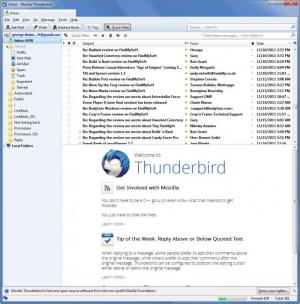
The interface is focused on ease of use, so even if you have never used an email client before, you shouldn't have any problems getting started with Thunderbird. To the left you have a list of folders: inbox, drafts, sent mail, trash, and so on. Assuming Inbox is selected, the upper pane presents all the emails in your inbox (you can sort them by date, subject, and so on). Click an email and a preview will be displayed in the lower pane; double click it and the email itself will be displayed.
As mentioned above, Thunderbird is an email client. This means it will present you with all your received emails, notify you when you receive new emails, lets you respond to emails, and lets you compose emails to send out. To help you stay on top of all your emails, the application lets you sort them into folders, lets you tag them, and it has a handy search box to help you find the email you’re looking for. As you start typing something into the search box, the application will immediately start the search and display you with results based on your query. If you find yourself searching for the same thing over and over again, save your search and rerun it when necessary.
Spam is a very big nuisance for everyone. The good news is that Thunderbird keeps spam messages at bay by using a leading-edge junk mail filter. And since we’re talking about security, it must be added that Thunderbird notifies you about potential phishing scams and it automatically updates itself so you’re always using the newest and safest Thunderbird version.
Firefox users will undoubtedly be aware of the fact that they can customize the browser’s looks and functionality with add-ons. The same applies to Thunderbird. You can get add-ons that change the interface and you can get add-ons that enhance the functionality of Thunderbird.
As already mentioned, Thunderbird is freeware. You don’t have to spend any of your money to use this properly good email client. Cons:
None that I could think of.
Pros
Choose between a Standard and a Custom installation. Thunderbird is available for Windows, Mac, and Linux, in a variety of localized versions. Thunderbird is free and open-source. The interface couldn’t be easier to use. Comes with a handy search feature (search the web or search within your emails). Use add-ons to customize Thunderbird. All the features you would expect from a properly good email client.

Cons
ider supporting Mozilla if you like Thunderbird. There aren’t enough words of praise to describe Thunderbird. It is spectacular from every point of view.

Mozilla Thunderbird
52.8.0
Download
Mozilla Thunderbird Awards

Mozilla Thunderbird Editor’s Review Rating
Mozilla Thunderbird has been reviewed by George Norman on 09 May 2012. Based on the user interface, features and complexity, Findmysoft has rated Mozilla Thunderbird 5 out of 5 stars, naming it Essential







